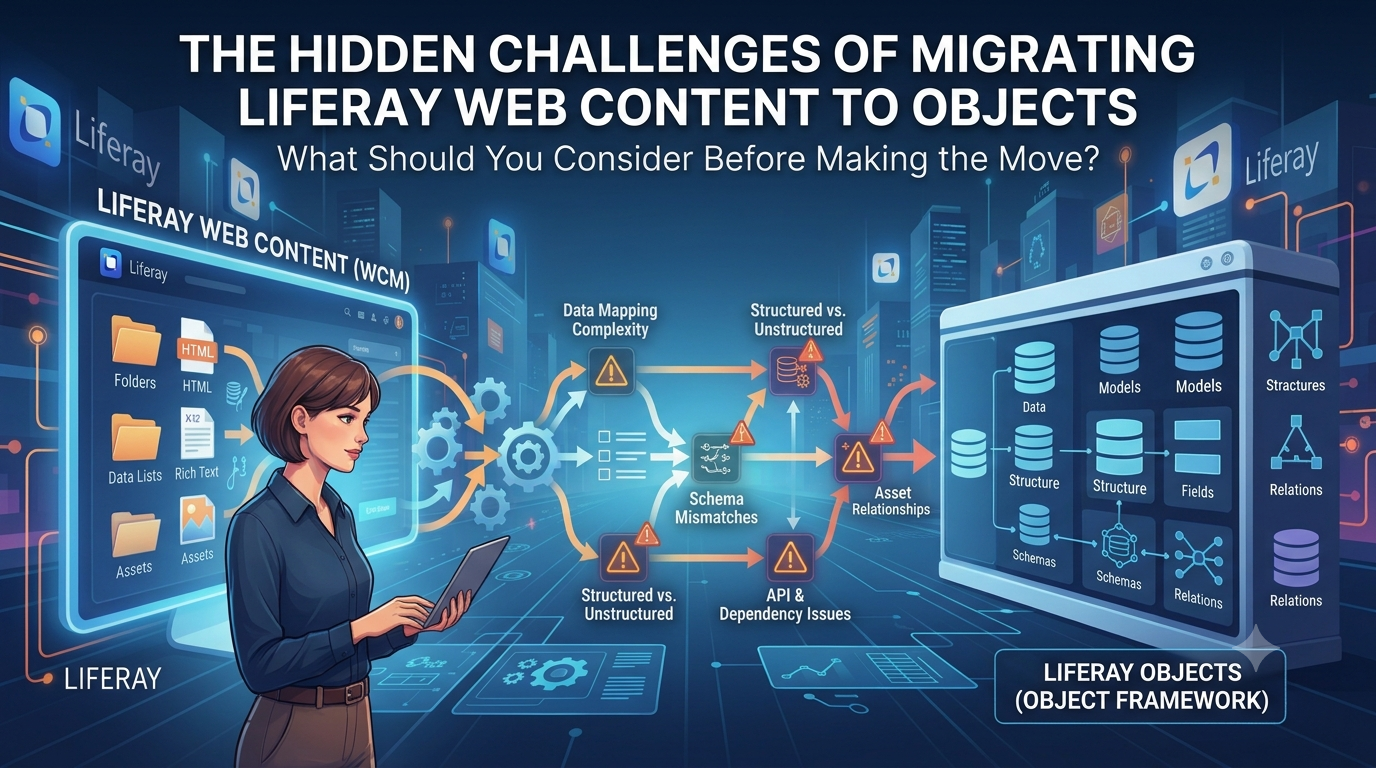


With Liferay's evolving content management capabilities, many organizations are evaluating whether they should move their existing Traditional Web Content into Liferay Objects. The motivation is understandable: Objects provide structured data, relationships, automatically generated APIs, and the ability to reuse business information across multiple applications.
However, there is an important question that organizations should ask before starting such a migration: Is converting existing Web Content into Objects really as simple as mapping fields and transferring data?
In most established Liferay implementations, the answer is no. Web Content structures may have evolved over several years and can contain repeatable fields, nested field groups, templates, localization, workflow configurations, permissions, categories, display logic, and integrations. These capabilities may not have a direct one-to-one equivalent when recreating the same content model using custom Objects.
The challenge is not necessarily that Objects cannot support the business requirement. In many cases, they can. The challenge is that the implementation approach, data structure, authoring experience, APIs, and presentation layer may need to be redesigned.
In this article, Lurantech explores the common technical and functional difficulties organizations may encounter when migrating Traditional Web Content into Liferay Objects.
1. Repeatable Fields: One of the Biggest Migration Challenges
Repeatable fields are commonly used in Liferay Web Content structures. They allow content authors to add multiple values or repeat an entire group of fields without changing the underlying structure.
Consider an Employee Profile structure containing:
- Employee Name
- Designation
- Department
- Contact Information
- Previous Experience (repeatable field group)
The Previous Experience group might contain Company Name, Job Title, Start Date, and End Date. An author can add as many experience records as required while creating a single Employee Profile.
In a custom Object implementation, this is not automatically reproduced as a repeatable group of fields. A common approach is to create a separate Experience Object and establish a one-to-many relationship with the Employee Object.
This introduces additional implementation work:
- Create a separate Object Definition for the repeating records.
- Configure the relationship between Employee and Experience.
- Design the authoring experience for adding, editing, and removing multiple related entries.
- Ensure the related entries are loaded and displayed in the correct order.
- Implement validation to prevent incomplete or inconsistent records.
- Update the presentation layer to retrieve and render related entries.
The situation becomes more complicated when a Web Content structure contains multiple repeatable groups, nested repeatable groups, or repeatable fields inside another repeatable group.
For example, an Employee may have multiple Projects, and each Project may contain multiple Responsibilities. Recreating this model may require several Object Definitions and relationships.
Why this matters: A structure that previously allowed an author to add repeated information in one content editing screen may now require a related-record management experience. This can increase development effort and make content creation less convenient unless the new interface is carefully designed.
2. Nested Field Groups Require Data Model Redesign
Traditional Web Content supports field groups that organize related fields together. These groups can also be nested and repeated, allowing organizations to model complex content without creating multiple independent content types.
For example, a Product structure could contain:
- Product Name
- Product Description
- Specifications
- Specification Name
- Specification Value
- Product Variants
- Variant Name
- SKU
- Available Colours
If these groups are repeated, the migration team must decide how to represent them in the Object model.
Should each group become a separate Object? Should some values be stored as multi-value fields? Should the information be represented through relationships? Or should the existing content model be simplified?
These are business and architecture decisions, not merely field-mapping decisions.
A poor redesign can result in too many Object Definitions, unnecessarily complicated relationships, additional API calls, and a difficult authoring experience.
3. Field Types Do Not Always Have Direct Equivalents
Web Content structures provide different field types for collecting and presenting content. When migrating to Objects, each field must be evaluated to determine whether it has a suitable equivalent or needs a different representation.
Some fields may be straightforward to map, while others require custom handling.
- Text and Rich Text: Text values may be mapped to Object fields, but rich content may require HTML handling, formatting validation, or a different content representation.
- Image and Document: Existing document and media references need to be mapped to the appropriate Object attachment or asset-management approach. File IDs, metadata, and permissions must be preserved where required.
- Select and Radio: Existing option labels and stored values must be mapped consistently. Picklists or other controlled-value models may need to be introduced.
- Multi-select: Multiple selected values need to be represented using an appropriate multi-value field or related records.
- Date and Date-Time: Time zones, date formats, and historical values must be handled carefully.
- Geolocation: Location data may need a different representation and rendering implementation.
- Link to Layout: A link to a Liferay page may need to be represented using a URL or another reference model, depending on the use case.
The exact field support depends on the Liferay version and the chosen target model. A migration team should verify the supported field types and behaviour in the target environment instead of assuming that every Web Content field can be copied directly.
4. Existing FreeMarker Templates Cannot Simply Be Reused
One of the most underestimated migration challenges is the presentation layer.
In many Liferay implementations, Web Content is closely connected to FreeMarker templates. These templates may contain years of custom logic for displaying content, formatting dates, rendering images, processing repeatable fields, handling optional values, and generating links.
When the underlying content is moved into Objects, the existing templates do not automatically become Object presentation templates.
The development team may need to:
- Recreate the existing presentation using Liferay Fragments or other supported rendering mechanisms.
- Replace FreeMarker field access with the appropriate Object data mapping or API integration.
- Rebuild conditional display logic.
- Recreate repeatable field rendering and nested layouts.
- Reimplement image, document, and link handling.
- Validate responsive layouts and existing page designs.
A website may contain dozens or even hundreds of Web Content templates. Rebuilding and validating all of them can become a significant part of the migration effort.
Important: This is not just a content migration. It can also become a front-end redevelopment project.
5. Existing Web Content Display and Fragment Dependencies
Many websites use Web Content Display widgets, collections, fragments, and other Liferay components to retrieve and present content.
These components may be configured around classic Web Content assets and their existing structures. Moving the data into custom Objects does not automatically update those dependencies.
The migration team must identify:
- Pages that display Web Content through widgets.
- Fragments that read fields from Web Content structures.
- Collections and collection providers that depend on existing content types.
- Display Page Templates and their mappings.
- Navigation menus or other components that depend on classic content assets.
Each dependency must be checked and, where necessary, rebuilt using components and mappings that support the chosen Object model.
This becomes especially important when a single Web Content structure is reused across multiple sites and hundreds of pages.
6. Localization and Multilingual Content Migration
Multilingual support is a major consideration for enterprise websites. Traditional Web Content commonly contains localized versions of titles, descriptions, rich text, and other fields.
When migrating this information into Objects, the team must verify how localization is configured and supported for every required field in the target Liferay release.
Potential challenges include:
- Mapping every existing language version to the correct Object entry.
- Handling fields that are not configured for localization.
- Preserving the default language and fallback behaviour.
- Maintaining translated rich text and formatted content.
- Handling partially translated records.
- Ensuring that APIs and front-end applications retrieve the correct localized values.
- Recreating language-specific presentation and validation rules.
Another important consideration is version-specific behaviour. Object localization capabilities have evolved across Liferay releases. For example, the supported localizable field types in earlier releases were more limited than in later releases.
Organizations should therefore test localization using their actual target version and data requirements before finalizing the migration design.
7. Workflow and Publishing Behaviour May Need to Be Recreated
Traditional Web Content may use approval workflows involving content authors, reviewers, approvers, and administrators. It may also rely on scheduled publishing, expiration dates, review dates, and other editorial processes.
Objects support workflow integration, but this does not mean that the existing Web Content publishing process is automatically transferred with identical behaviour.
The migration team should evaluate:
- Whether the same workflow definitions can be reused or need modification.
- How draft, pending, approved, and rejected states should be represented.
- Whether approval notifications and assignments need to be recreated.
- How scheduled publishing and expiration requirements will be implemented.
- Whether existing business rules depend on Web Content-specific status behaviour.
- How users will preview content before it becomes publicly available.
For organizations with complex editorial approval processes, workflow redesign and user acceptance testing can take considerable time.
8. Version History and Audit Requirements
Web Content may have a long version history containing previous edits, approvals, and published versions. This history can be important for compliance, legal review, or business operations.
When migrating to Objects, organizations should not assume that all historical Web Content versions can be transferred into Object entry history as equivalent records.
Questions to address include:
- Is only the latest approved version required?
- Must previous versions remain accessible?
- Is there a legal or audit requirement to preserve historical content?
- Should historical versions be stored as separate records or archived outside the new model?
- Can the original author, modification date, and approval information be preserved?
If historical traceability is important, the migration strategy must explicitly address it. A simple field-by-field data transfer may not satisfy the requirement.
9. Categories, Tags, and Asset Relationships
Web Content often uses categories, tags, vocabularies, and related assets to organize information. These are frequently used by search, filters, navigation, and page components.
Objects also integrate with Liferay's categorization capabilities, but the migration team must verify the scope, vocabulary configuration, and relationships in the target model.
Potential issues include:
- Mapping existing categories and tags to the correct Object entries.
- Handling site-scoped and global vocabularies.
- Preserving category hierarchies and classification rules.
- Rebuilding search filters that depend on classic asset metadata.
- Reconnecting documents and images to their new records.
- Checking whether existing asset selectors and components support the new data model.
If categorization is not migrated correctly, the content may still exist but users may no longer be able to discover it through the same navigation and search experience.
10. Permissions and Role-Based Access Control
Enterprise Liferay environments often have carefully configured permissions. Different users may be allowed to view, create, update, approve, or delete content based on their roles and site membership.
When content is moved into Objects, permissions need to be reviewed at both the application and entry level.
Consider the following situations:
- A user can edit content in one site but only view it in another.
- Only a particular department can update employee information.
- Some content is visible to authenticated users, while other content is public.
- Approval rights are restricted to specific roles.
- Related records have different access requirements from their parent records.
A one-to-many Object relationship does not automatically guarantee that the same security behaviour as the original Web Content implementation will be reproduced.
Permissions must be designed, configured, and tested against actual user roles. This is especially important when Object APIs are exposed to external applications.
11. Relationships Can Make the Data Model More Complex
Relationships are one of the major strengths of Liferay Objects. They allow organizations to connect related records and create reusable business data models.
However, introducing relationships during migration also creates new design decisions.
For example, a Web Content article may contain an Author Name as a simple text field. An Object implementation might instead require a relationship with an Author Object.
Before choosing that approach, the team must determine:
- Should the author be a separate reusable entity?
- Can one author be associated with multiple articles?
- What happens if an author record is deleted?
- Can a relationship be mandatory or optional?
- Should related entries inherit permissions?
- How should related data be retrieved through APIs?
Relationships also need careful consideration when the original Web Content contains nested or repeating data. A design with too many related Objects can create unnecessary API calls and a complicated editing experience.
The objective should be to create a sensible business data model, not to turn every individual Web Content field into a separate Object.
12. Data Validation and Business Rules Need Reassessment
Web Content structures may contain mandatory fields, predefined options, and authoring rules. Existing templates may also include additional validation or conditional display logic.
When migrating to Objects, these rules must be reviewed and implemented using the available Object validations, field configurations, actions, and any required custom application logic.
Examples include:
- Making a field mandatory only under certain conditions.
- Validating date ranges, such as Start Date being earlier than End Date.
- Preventing duplicate records.
- Ensuring that a selected category belongs to an approved list.
- Validating related records before saving a parent entry.
- Applying business rules across multiple related Object entries.
Not every rule can be recreated through a simple field configuration. Some may require custom logic or integration with another service.
13. Existing APIs and External Integrations May Break
Many organizations already consume Web Content through Liferay's Headless Delivery APIs or custom REST endpoints. External websites, mobile applications, search services, and integration platforms may depend on the current API response format.
Moving content to Objects can change:
- API endpoint paths and resource names.
- Field names and response structures.
- How repeatable and nested data is represented.
- How related records are retrieved.
- Authentication and permission requirements.
- Filtering, sorting, pagination, and search behaviour.
Even when the new Object APIs provide equivalent information, existing consumers may not understand the new response structure.
The migration team may need to update client applications, API integrations, middleware, and automated tests. In some cases, an API compatibility layer may be required to avoid changing every consumer at the same time.
14. Content URLs, SEO, and Existing Page References
Web Content may be referenced through friendly URLs, display pages, navigation links, search results, and external websites.
When the content model changes, these references must be reviewed to avoid broken links and loss of search visibility.
The migration plan should consider:
- Whether existing friendly URLs can be retained.
- Whether display pages need to be recreated.
- How canonical URLs and metadata will be managed.
- Whether redirects are required.
- How internal page links and navigation references will be updated.
- Whether external applications store or bookmark existing content URLs.
A technically successful migration can still create a poor user experience if existing links stop working or search engine rankings are affected.
15. Authoring Experience May Become Less Convenient
This is a business challenge that is sometimes overlooked by technical teams.
Traditional Web Content provides an editorial authoring experience in which users can enter related information within a single content item. This is especially useful for marketing teams, editors, and non-technical users.
If the same content is redesigned using several related Objects, authors may need to navigate between records, manage relationships, and understand a more complex data model.
For example, creating an Employee Profile with five previous employment records may be straightforward with a repeatable field group. In a related-Object model, the authoring interface must make it easy to create and associate all five records.
Without a well-designed layout and workflow, the migration may reduce productivity rather than improve it.
16. Large-Scale Migration Can Become a Data Engineering Project
Migrating a small number of Web Content articles may be manageable with a simple script. Migrating thousands or hundreds of thousands of records across multiple sites is a different challenge.
A reliable migration process may need to handle:
- Extracting data from Web Content structures and articles.
- Transforming nested and repeatable field values.
- Creating parent and child Object entries in the correct order.
- Maintaining relationships between records.
- Transferring images and documents.
- Preserving categories, tags, and localization.
- Handling missing, invalid, or duplicate values.
- Retrying failed records without creating duplicates.
- Logging migration results and errors.
- Comparing source and destination data after migration.
A migration script must also be designed for safe reruns. If a batch fails halfway through, the team should be able to resume it without creating duplicate Object entries or broken relationships.
This is why production migrations usually need extraction, transformation, loading, reconciliation, monitoring, and rollback planning rather than a single import operation.
17. Testing Effort Can Be Much Larger Than Expected
A migration is not complete merely because the records appear in the new Object Definitions.
Organizations must verify that the new implementation behaves correctly for both content authors and end users.
Testing should cover:
- Field-level data accuracy.
- Repeatable and nested record counts.
- Relationship integrity.
- Localized content and fallback behaviour.
- Workflow transitions and permissions.
- API responses and external integrations.
- Search, filters, and categorization.
- Page rendering and responsive layouts.
- Performance under realistic data volumes.
- Regression testing of existing website functionality.
The organization should also involve content authors and business users in acceptance testing. A technically correct Object model is not sufficient if the people responsible for maintaining the content cannot use it effectively.
18. Migration Can Affect Publications and Deployment Processes
Some Liferay implementations use Publications, staging, or established deployment procedures to coordinate changes across environments.
The migration team must verify how the target content model interacts with these processes. For example, Liferay's New CMS documentation states that CMS site content and structure changes are not tracked by Publications.
This is an important consideration for organizations whose current release process depends on Publications to coordinate content and configuration changes.
Before migration, teams should define how Object Definitions, entries, CMS structures, and related configuration will be promoted between development, test, staging, and production environments.
19. Performance and API Design Need Attention
A Web Content structure may store several related values inside one content item. If that data is redesigned as multiple related Object entries, the application may need to retrieve information from several resources.
For example, displaying one Employee Profile might require retrieving the employee record, department information, previous employment records, and project details.
If the application performs multiple independent requests for every record, page rendering can become slower and API traffic can increase.
The new implementation should therefore consider:
- Efficient relationship queries and supported API expansion capabilities.
- Pagination for large related-record collections.
- Caching frequently requested information.
- Avoiding unnecessary repeated API calls.
- Indexing and filtering requirements.
- Performance testing with realistic content volumes.
A normalized data model is useful, but it should also be designed with the actual read and write patterns of the application in mind.
20. Migration May Create Unnecessary Complexity if the Business Requirement Is Editorial
Not every Web Content structure represents a business entity that should become a custom Object.
Consider a news article, marketing announcement, press release, or editorial blog. These are primarily publishing-oriented content types.
If the organization migrates these records into custom Objects without a clear business requirement, it may end up rebuilding editorial capabilities and presentation logic that already work well in the existing CMS.
This can introduce additional development, maintenance, and operational costs without delivering meaningful business value.
The migration decision should be based on how the content is used, not simply on whether a newer technology is available.
21. A Note About the New Liferay Headless CMS
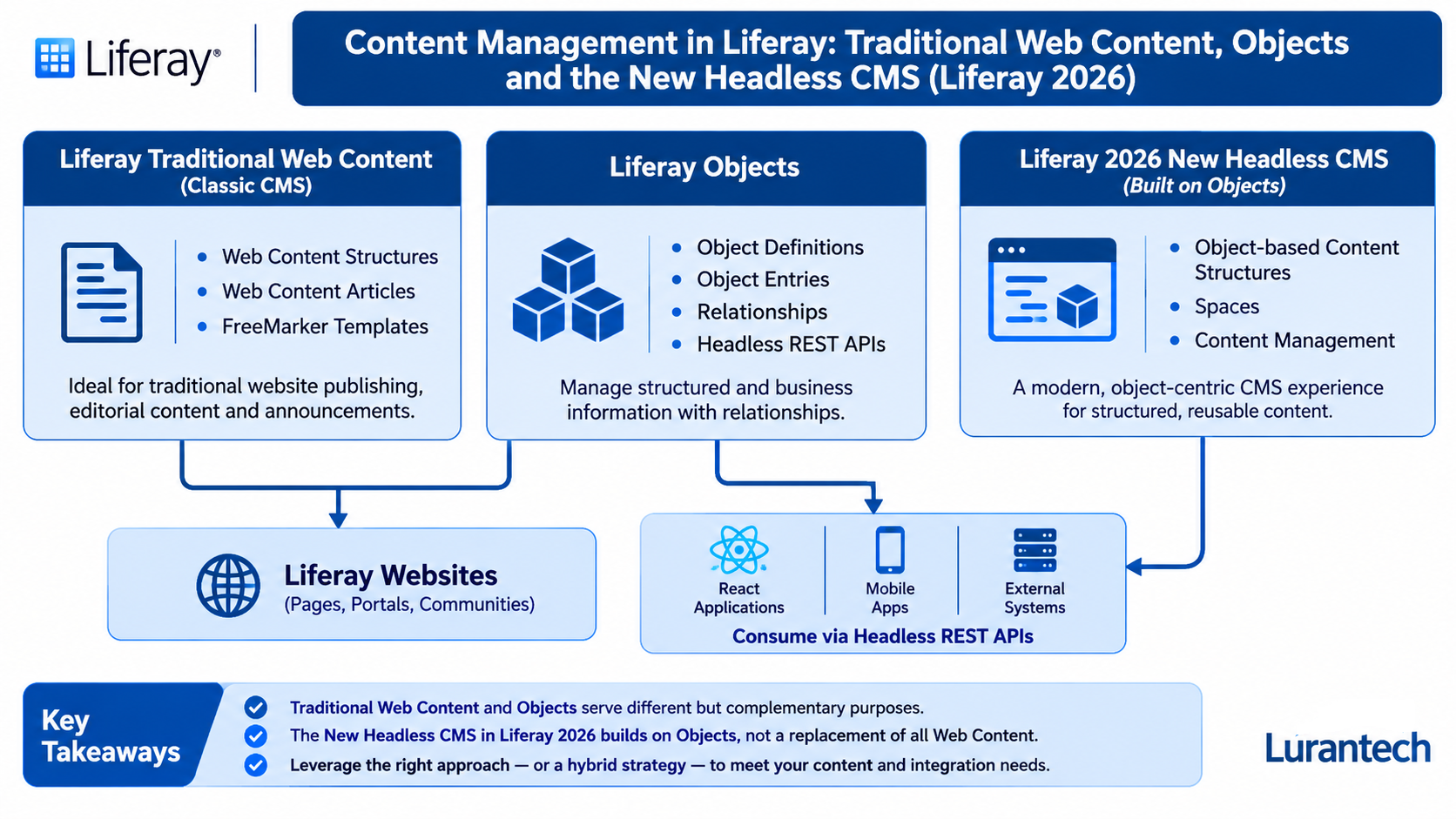
It is important to distinguish custom Objects from the New Headless CMS introduced in later Liferay releases.
The New CMS is built on the Objects framework, but it provides content-management capabilities specifically designed for managing articles, blogs, files, and other structured content.
Its content structures support capabilities such as nested fields and repeatable fields. Therefore, a migration to the New CMS should not be evaluated as though it were identical to creating a custom Object Definition for every content type.
However, moving to the New CMS still requires careful assessment. Existing FreeMarker templates, classic widgets, content dependencies, integrations, and publishing processes may need to be redesigned or replaced. Some legacy components and selectors are not compatible with CMS assets.
Organizations should select the target model based on the use case:
- Traditional Web Content: Existing editorial content and established classic CMS implementations.
- Custom Objects: Structured business entities, reusable operational data, and application-oriented use cases.
- New Headless CMS: Modern content management, structured editorial content, and headless or hybrid content delivery.
The right migration target may be different for different content types within the same Liferay implementation.
22. How Can Organizations Reduce Migration Risks?
A successful migration begins with an assessment, not with writing a migration script.
We recommend following a structured approach:
- Inventory existing structures: Identify all Web Content structures, templates, articles, and their dependencies.
- Identify complex fields: Pay special attention to repeatable groups, nested fields, images, documents, and multilingual fields.
- Review business purpose: Determine whether each content type is editorial content, structured business data, or a combination of both.
- Choose the target model: Decide whether the content belongs in custom Objects, the New Headless CMS, or should remain in Traditional Web Content.
- Design the target structure: Define fields, relationships, validations, permissions, and localization before migrating records.
- Build a proof of concept: Select one representative content type with complex fields and migrate a small sample.
- Rebuild the presentation layer: Validate templates, fragments, display pages, and API consumers.
- Perform data reconciliation: Compare source and destination records, relationships, translations, and assets.
- Plan the cutover: Define content freeze, final synchronization, rollback, and post-migration support.
23. Should Every Web Content Structure Be Migrated to Objects?
No. The decision should be driven by business requirements and the long-term architecture of the application.
Objects are an excellent option when information represents reusable business entities, needs relationships, is consumed through APIs, or must be shared across multiple applications.
However, if the existing Web Content is primarily editorial, depends heavily on mature templates, or has complex publishing requirements, migration may create more work than value.
A hybrid approach is often more practical. Organizations can retain suitable editorial content in the existing CMS, use Objects for business data, and adopt the New Headless CMS for content types that benefit from its capabilities.